
Catalog ingestion and indexing best practices
This article covers best practices for efficiently ingesting and indexing product catalog data with Constructor. Following these recommendations will help you achieve optimal performance, avoid rate limiting, and ensure your catalog updates are processed quickly.
How catalog updates work
When you send catalog updates to Constructor, they go through several stages:
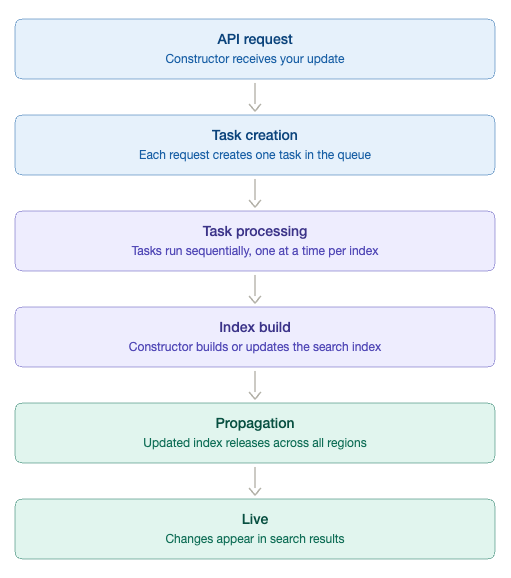
Task queue
Constructor processes catalog updates through a task queue in the following way:
- Each API request = 1 task (regardless of how many items it contains).
- Tasks are processed one at a time per index to prevent conflicts or data inconsistencies.
- The queue has a maximum capacity to ensure system stability.
This means 1,000 requests with 1 item in each of the requests will take much longer than 1 request with 1,000 items. It is highly recommended to upload 1,000 items in 1 request rather than 1,000 separate requests with 1 item update each.
Catalog ingestion: Rate limits and quotas
The following table outlines the current operational quotas for Constructor's ingestion and indexing process:
| Quota category | Maximum limit | Frequency/scope |
|---|---|---|
| API requests | 100 requests | Per minute, per API key |
| Task queue | 1,000 tasks | Maximum concurrent tasks queued |
| Request Size (v2/items v2/variations - for JSON upload) | 10,000 items/variations | Per individual request |
Rate limit headers
Constructor uses headers to provide helpful information in every API response that helps you monitor usage. Keep an eye on these headers to avoid exceeding your limits and receiving error messages.
X-RateLimit-Limit: 100              # Maximum requests allowed per minute
X-RateLimit-Remaining: 87           # Requests you have left in the current minute
X-RateLimit-Reset: 1709127600       # When your limit resets (Unix timestamp)
X-RateLimit-Tasks-Remaining: 750    # Tasks available in the queue
💡 Tip: If you notice that your remaining requests or queue capacity is getting low, slow your request rate or increase your batch sizes to stay within limits.
Batching strategies
Batching Golden Rule
Batch your updates until you reach 10,000 items OR at least 1 minute has passed, whichever comes first.
For the fastest, most efficient catalog ingestion and indexing, it is critical to optimize your batching strategy. A highly effective strategy is to send fewer requests, each containing a larger batch of data, rather than numerous smaller requests. This approach drastically reduces processing overhead.
❌ The Slow Way
- Send 1,000 separate requests with 1 item each
- Creates 1,000 tasks in the queue
- Takes much longer due to processing overhead
✅ The Fast and Recommended Way
- Collect 1,000 items on your end
- Send 1 request with all 1,000 items
- Creates just 1 task in the queue
- Processes in seconds and goes live in 2-5 minutes
Why it works: Constructor's system is built to handle large batches efficiently. By grouping your updates together, you minimize overhead and get your changes live faster. With proper batching, Constructor can typically process 1,000-2,000 items per second for well-batched requests.
Real world exampleA fashion retailer with 200k items and variations in the catalog was sending 50-140 requests per second, each with fewer than 200 items.
- Problem: This resulted in the updates taking 20x longer to process due to task processing overhead
- Solution: Batching updates into groups of 8,000-10,000 items reduced processing time by 95%.
- Takeaway: Batch your updates. More frequent small requests create overhead that dramatically slows processing.
Choose the best ingestion method
To give you more insight into the best way to send your catalog, below is a short guide that outlines which ingestion action to use and when.
Method 1: Periodic full syncs
Use case: Daily, weekly, or scheduled complete catalog uploads
Benefits
- Ensures system self-recovery
- Automatically removes outdated items
- Best for complete state synchronization
Best practice
- Schedule during off-peak hours
- Use gzip compression to reduce transfer time
- Ideal cadence: daily or weekly, depending on catalog volatility
Method 2: Incremental updates
Use case: Frequent updates (prices, inventory, new products)
Benefits
- Updates specific items without full catalog upload
- Lower bandwidth requirements
- Faster processing for small sets of changes
Best practice
- Batch updates as described above (10K items or x minutes)
- Use
patch_delta=trueto update only changed fields - Monitor queue status via rate limit headers
Method 3: Hybrid approach (recommended)
For most customers, we recommend combining both methods:
- Daily/Weekly: Full sync for consistency
- Throughout the day: Batched incremental updates for time-sensitive changes
This method ensures both freshness and data integrity.
Real world exampleLet's look at how a mid-sized fashion retailer with 300K products optimizes their catalog ingestion.
Their challenge
- Over 300,000 products in catalog from multiple brands
- Prices change multiple times per day during sales
- Inventory updates every 15 minutes from warehouses
- New collections added weekly
- Categories rarely change
Their solution
- Daily full sync (11 AM UTC): Complete catalog with product names, descriptions, images, categories - ensures data consistency.
- Every 15 minutes: Batched price and inventory updates, typically 2,000-7,000 items per batch.
- Real-time (as needed): New product launches batched and sent immediately.
Result
- Catalog stays fresh without overwhelming the system.
- 2-3 minute latency for price/inventory changes.
- Reduced bandwidth by 65% compared to frequent full syncs.
Optimizing update frequency
Separate by update cadence
Different types of data have different update needs. To optimize catalog ingestion and indexing, categorize your data based on its update frequency. This avoids uploading static data repeatedly and focuses bandwidth on what actually changes.
| Data type | Recommended update cadence | Recommended ingestion method |
|---|---|---|
| Full product catalog | Daily or weekly | Full sync |
| Individual item or variation updates | Every few minutes | Delta |
| Price and inventory data | Every few minutes | Patch delta |
Indexing best practices
Constructor builds search indexes for fast, relevant results, limiting to one build at a time to prevent data inconsistencies. Sometimes, due to various circumstances, the index build time may differ for a similar catalog size. Let’s review what are the factors that can affect it.
Types of index builds
Primary (full) index build
In a primary (full) index rebuild, Constructor rebuilds the full index, producing the most consistent baseline.
Incremental index build
Instead of rebuilding the full index for every change, Constructor can produce smaller index updates and layer them on top of the primary index. These are referred to as incremental indexes. These updates occur between primary builds, so changes can become searchable sooner.
Please note: Incremental index builds can accumulate. Over time, this “incremental layer” may need to represent an ever-larger set of changes since the last primary build. This is why you might see:
- Fast index builds early in a cycle of sending updates, if incremental is enabled.
- More variable (and sometimes longer) incremental index build times later in the same cycle
A primary build consolidates accumulated changes into a fresh baseline and effectively “resets” the Incremental layer.
A note on incremental indexesIncremental indexes are enabled by request. Please reach out to your Customer Success Manager for further assessment.
Design your index for faster build times
Index build time is driven primarily by catalog size (items, variations, and relationships) and data configuration (facets, searchability, displayability, and metadata richness). The most effective optimizations reduce the amount of data the index needs to process and the amount of configuration it needs to compute.
1) Reduce the total number of records where possible (items + variations)
- If your catalog is variation-heavy, expect longer builds.
- Keep shared attributes at the item level instead of repeating them across every variation.
- Keeping shared attributes (like
brand,category,description, andmaterials) on the item-level instead of duplicating them on every variation reduces record size and duplication, which speeds ingestion and index builds and lowers the chance of inconsistencies across variants.
- Keeping shared attributes (like
- Avoid creating unnecessary “near-duplicate” variations (e.g., variations that differ only in descriptive text that isn’t used for filtering/search).
- A common example is creating separate variations like “t‑shirt, size M, red” where the only difference is a longer marketing description (“soft cotton”, “summer vibe”) that is not used for filtering, pricing, or search relevance, instead of keeping one variation and storing that text at the item level.
2) Be deliberate with item groups and relationships
- Item groups and additional relationships add work during index build.
- Only model relationships you actively use in the customer experience (e.g., grouping variants, bundles, or clearly defined product families).
3) Keep facets lean and high-signal
- Every facet adds build-time work (and increases the amount of data the index needs to prepare).
- Remove unused facets and consolidate overlapping facets (e.g., multiple versions of “color” or “size”)
- Prioritize fewer, well-structured facets over many low-value facets.
4) Keep searchable fields purposeful
- Only mark fields searchable if you expect them to impact search relevance or query coverage.
- Avoid making large, verbose fields searchable unless they drive real user value.
5) Control metadata richness (especially large text fields)
- Rich metadata might be useful, but heavy payloads increase indexing time.
6) Set expectations by catalog tier
- Bigger catalogs of above 1 million items (and especially variation-heavy catalogs) will have higher baseline index build times.
- If your catalog is large, we recommend aligning on expected build windows and an update strategy with Constructor before go-live.
Overall recommendations
Overall recommendation to optimize your catalog upload encompasses best practices for both ingestion and indexing.
- Batch your updates
- Accumulate changes and send in batches (up to 10K items).
- Reduces queue congestion and speeds up processing.
- More efficient than sending individual item updates.
- Use patch delta
- Only send fields that changed, not entire item payload.
- Reduces payload size and processing time.
- Monitor queue status
- Watch
X-RateLimit-Tasks-Remainingheader. - Maintain buffer capacity in the task queue.
- Avoid overwhelming the system with too many concurrent tasks.
- Watch
- Balance frequency and freshness
- Don't update more frequently than necessary.
- Find the right cadence for your business needs.
- Consider user expectations for data freshness.
- Simplify your catalog
- Remove unused facets and metadata fields.
- Consolidate similar variations when possible.
- Clean up stale or inactive products before upload.
Updated 4 months ago