
Searchandising
Searchandising allows merchandisers to influence the ranking of items on results page based on short-term needs of their business, such as upcoming promotions, brand partnerships, and seasonality trends.
They are also useful when merchandisers have new information about a product or their customer base. For example, a product has gone viral on social networks, and a merchandiser wants to boost a similar product that their company carries. Or a recall has been issued for a product, and the merchandiser wants to hide it in search results.
Rules can be defined based on attributes like product name, brand, category, price range, availability, or custom metadata. Only attributes/facets with visible or hidden visibility are available for searchandising. Learn more here.
Where do I configure searchandising rules?
Merchandisers can configure searchandising rules in the Constructor dashboard, or via the API.
Learn how to set up rules for search queries, browse categories, collections, campaigns, and more in the Constructor dashboard.
Dive into our API documentation and learn how to configure searchandising rules for search queries, browse categories, campaigns, and more.
Rule levels
The level a merchandiser creates a rule for will impact the reach of the strategy they are trying to implement.
- Single-context: Context refers to a single results page for which a merchandiser is creating a rule. For example, a results page for a specific search query, browse category, collection, or facet page.
- Campaign: In a campaign, a merchandiser can create and apply rules to one or more context (e.g., results pages for different search queries, browse categories, collections, and facets).
- Global: When a merchandiser creates a rule at the global level, they apply the rule across all results pages for a specific experience. For example, a merchandiser creates a global blocklist rule for search that removes all items with zero inventory from every search query results page on the website.
Searchandising rules for recommendation podsRecommendation pods are treated as separate entities in the Searchandising system. Merchandisers can create and apply rules for a pod or a strategy. Learn more about creating rules for recommendation pods here.
Types of searchandising rules
Here are the rules available in Constructor:
- Boost: Increase the ranking of an item or item attribute in a results set. Boost options include 3%, 7%, 10%, and custom strength. Learn more here.
- For example, a grocer has a promotional contract with a soft drink brand. They can boost that brand for related search queries, browse category pages, and collections to increase visibility of that brand’s items on those pages.
- Bury: Decrease the ranking of an item or item attribute in a results set. Bury options include 3%, 7%, 10%, and custom strength. Learn more here.
- For example, a company could bury out-of-stock or low inventory items so they appear towards the end of the search results, but are still accessible if needed.
- Slotting: Lock an item or item attribute in a specific position in a results set.
- For example, a clothing retailer wants to highlight matching outfits for the whole family at the top of their
Holidaycollection for stronger visual merchandising.
- For example, a clothing retailer wants to highlight matching outfits for the whole family at the top of their
- Blocklist: Remove a specific item or item attribute from a results set.
- For example, a company wants to keep items with the attribute
discontinued:truefrom appearing on results pages.
- For example, a company wants to keep items with the attribute
- Allowlist: Only include specific item attributes in a results set.
- For example, a retailer only wants items from specific brands to appear in the search results for the query
luxury handbags.
- For example, a retailer only wants items from specific brands to appear in the search results for the query
- Content: Display content, such as banners, on specific results pages.
- For example, an outdoor retailer wants to promote a new guide they have published on selecting the best hiking backpack, so they create a content rule that displays a clickable banner on related pages.
Additional configuration options
When configuring a searchandising rule, you also have the option to apply the rule to a specific user segment and/or define a time frame in which the rule is active.
Assign a user segment
Assigning a user segment to a rule ensures that only a specific audience sees the impact of the rule on search or browse results. Available segments include geo-based (e.g., city, region, etc), those passed to Constructor via the us parameter, and AI-generated segments (e.g., RFM, Affinity, etc.).
For slotting rules, multiple slotting rules can exist for the same position if each rule is for a different user segment.
Define a time frame
Merchandisers can define a time frame for each rule they create. These time frames may coincide with a specific promotion schedule or can also be used to ensure that rules do not become stale and start negatively affecting page and item performance. Merchandisers can review potentially harmful rules using the Merchandised Page Performance report.
For slotting rules, multiple slotting rules can exist for the same position if the rules do not have overlapping time frames.
Manual vs. automatic rules
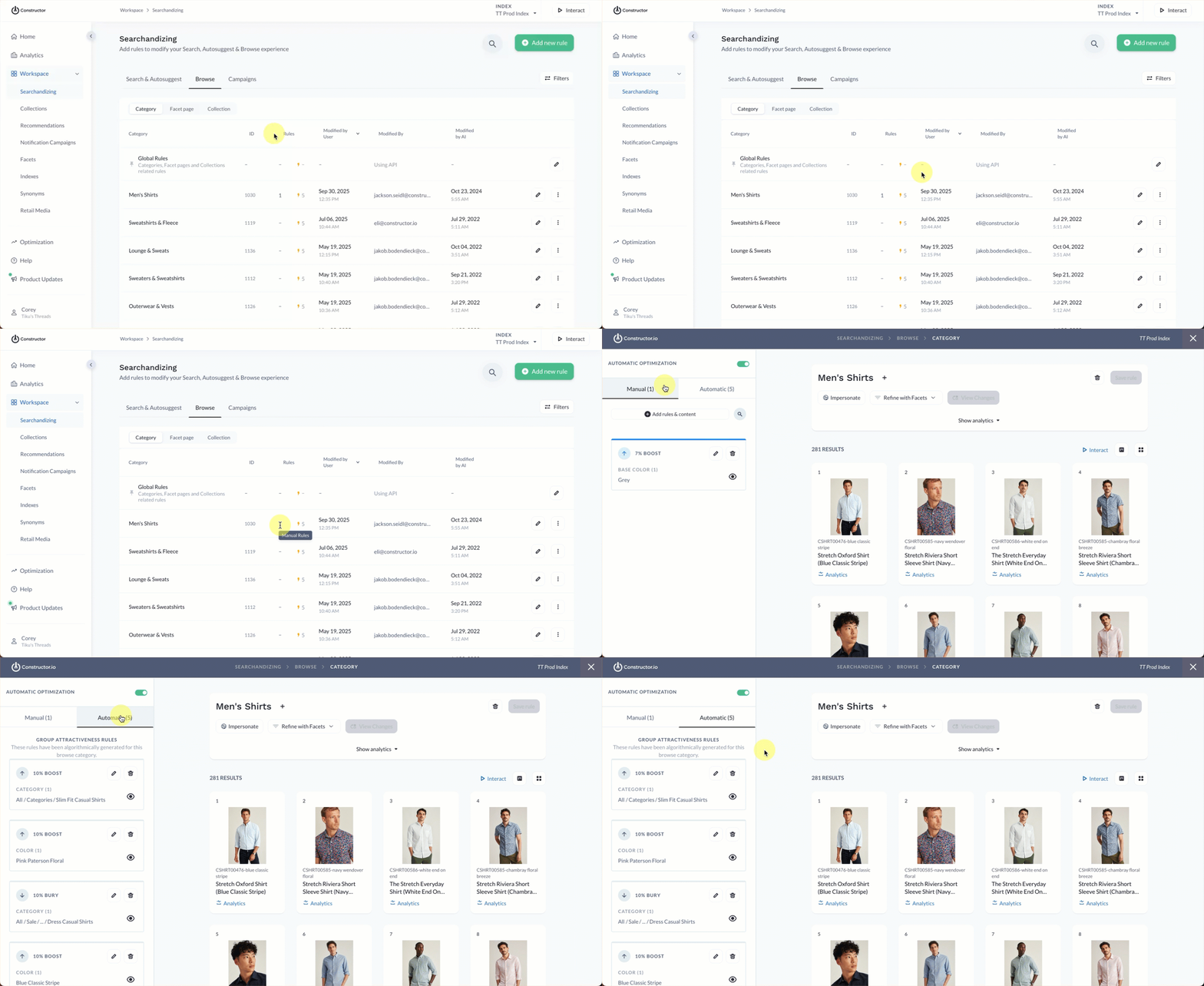
Manual rules are the rules merchandisers create to support their company’s short-term strategic business objectives (e.g., promotions, brand partnerships, etc.). However, Constructor's machine learning algorithms work to optimize your results by creating automatic rules based on user behavior.
For example, the algorithms might notice that, for a US grocery retailer, the search for pepper usually results in the purchase of the spice. Meanwhile, the search for peppers usually results in the purchase of bell peppers.
For this reason, the algorithms might create the following automatic rules:
- A 10% boost for the
spicecategory (an item attribute) for the search querypepper. - A 10% boost for the
vegetablecategory (an item attribute) for the search querypeppers.
Automatic rules live next to manual rules in the searchandising menu, and merchandisers can manually delete these rules if desired.
Reporting for searchandising rules
Merchandisers should regularly review the impact of searchandising rules on page and item performance.
- Merchandised Page Performance report. This report gives merchandisers visibility into how the manual slotting, boost, and bury rules are potentially impacting item and page performance on specific search, browse category, collection, and facet pages.
Updated 9 months ago