
Learn about badges
Badges are visual labels on item tiles that encourage purchasing by highlighting important information about the item. They help shoppers quickly identify popular, new, or trending items, enhancing their shopping experience.
Merchandisers often struggle with badges due to the need for consistent application, timely updates, and identifying which badges effectively drive sales. Certain badges also require specific data calculations, which many existing tools cannot automate.
Constructor's AI-powered badges algorithm automates this process, ensuring badges are applied to the right items at the right time, ultimately boosting KPIs and aligning with a company’s strategy.
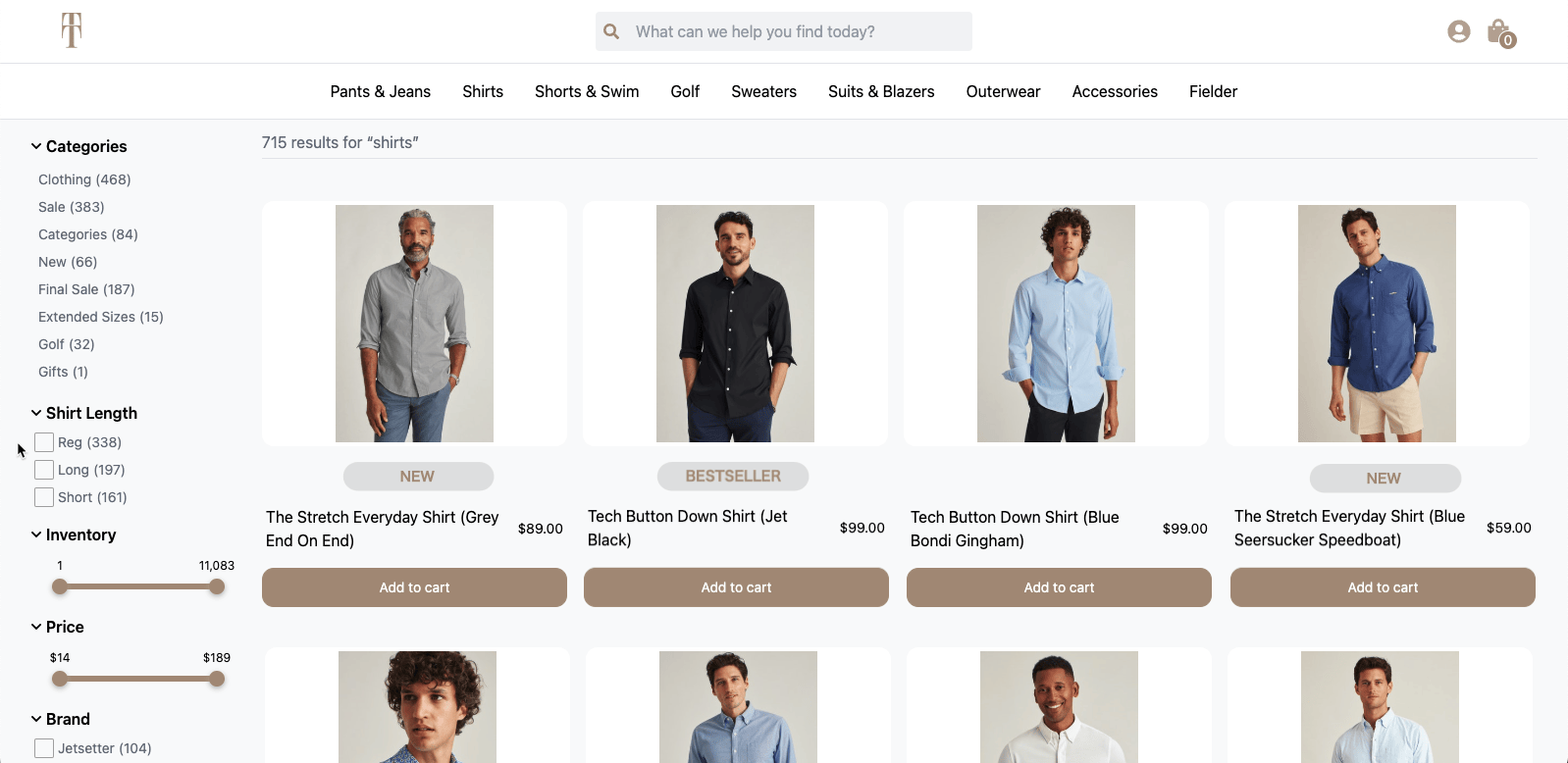
Badges appear on item tiles for select items on this PLP.
Key benefits
- Encourage purchasing.
- Badges highlight specific item information, such as popularity, newness, or trending status, which can motivate users to purchase.
- Enhance the shopping experience.
- Badges help users quickly identify key items, improving their overall shopping experience by making it easier to find popular or relevant items.
- Automate badge management.
- For merchandisers, badges simplify the challenging task of managing badge application. Constructor automates consistent and timely badge updates.
- Boost key performance indicators (KPIs).
- By effectively highlighting items, badges can contribute to increased sales and align with editorial strategies, positively impacting KPIs.
Types of badges
Constructor calculates and applies two different types of badges: global and context-dependent.
Global badges
Global badges are calculated based on item performance across all search queries and browse categories.
For example, an item might earn a Bestseller badge because it has the highest sales across a company’s site, regardless of the specific query or category. For instance, a particular sneaker style might be the top seller across all categories, making it eligible for a global Bestseller badge.
| Badge Name | Detail |
|---|---|
| Bestseller | Applied to items with the highest number of purchases (or add to carts) over a specified number of days. |
| Trending Now | Applied to items with a high growth rate in clicks, conversions, and/or purchases over a specified number of days. |
| New Arrivals | Applied to items a company added to their catalog after a specific date, such as the last 30 days or their last catalog upload. |
Context-dependent badges
Context-dependent badges are calculated based on specific queries or categories.
For example, an item might earn a Trending Now badge in the "Mobile phones" category because it’s performing exceptionally well in that category, even if it’s not a top seller across the entire site. For instance, a mid-range phone has recently seen a surge in purchases and clicks within the "Mobile phones" category. The item would be eligible for a query-dependent Trending Now badge.
| Badge Name | Detail |
|---|---|
| Bestseller | Applied to items with the highest number of purchases (or add to carts) over a specified number of days (i.e. query or category). |
| Trending Now | Applied to items with a high growth rate in clicks, conversions, and/or purchases in the given context (i.e. query or category) over a specified number of days. |
A note on context-dependent badgesAt this time, context-dependent badges are only available for PLPs (e.g., search results pages, browse category pages, facet pages, and collections).
Badges across the shopping journey
Constructor supports badges across three key shopping surfaces: product listing pages (PLP), product detail pages (PDP), and recommendations pods. Together, these placements create a consistent, connected experience that helps shoppers feel confident at every step, from browsing to buying.
All three surfaces support the same badge types: Bestseller, Trending Now, New Arrivals, social proof badges, and attribute-based badges. Context-dependent badges are only available for PLPs.
Product listing pages (PLP)
PLPs are where shoppers view an array of items returned for a search query, browse category, or collection. This is where badges have the most surface area to influence decisions quickly.
Constructor returns badge information in the API response for a search results page, browse category page, or collection page.
Learn more about implementing badges on the PLP.
Badges appear on item tiles for select items on this PLP.
Why it matters:
- When shoppers are moving fast through a list of items, badges give them an immediate signal about which items are worth a closer look, reducing friction and encouraging clicks on high-performing products.
Product detail pages (PDP)
PDPs are where shoppers make their final purchase decision. Constructor returns badge information in the response from the Product Details API, so the same badges a shopper saw on the PLP follow them to the item page.
Learn more about implementing badges on the PDP.
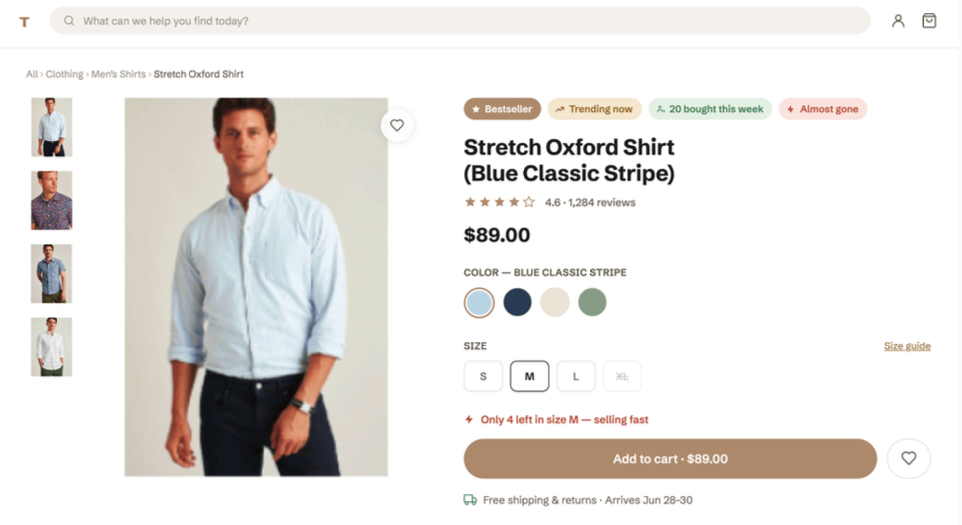
Badges appear at the top of a product detail page (PDP).
Why it matters:
- Shoppers who click through from a search result or category page are already interested in an item. Seeing the same Bestseller or Trending Now badge on the PDP reinforces that interest and adds confidence at exactly the moment they're deciding whether to add to cart.
- Attribute-based badges (such as Eco-Friendly or Wireless Charging) and social proof badges (such as 24 Bought Today) can be especially valuable here, where shoppers are evaluating specific product details.
Recommendations pods
Recommendations pods surface relevant items throughout the shopping experience, from homepages to category pages to PDPs. Constructor returns badge information alongside recommended items, so badges can be rendered directly on recommendation tiles.
Constructor returns badge information for recommendations pods as part of the response from the Recommendations API.
Learn more about implementing badges on recommendation pods.
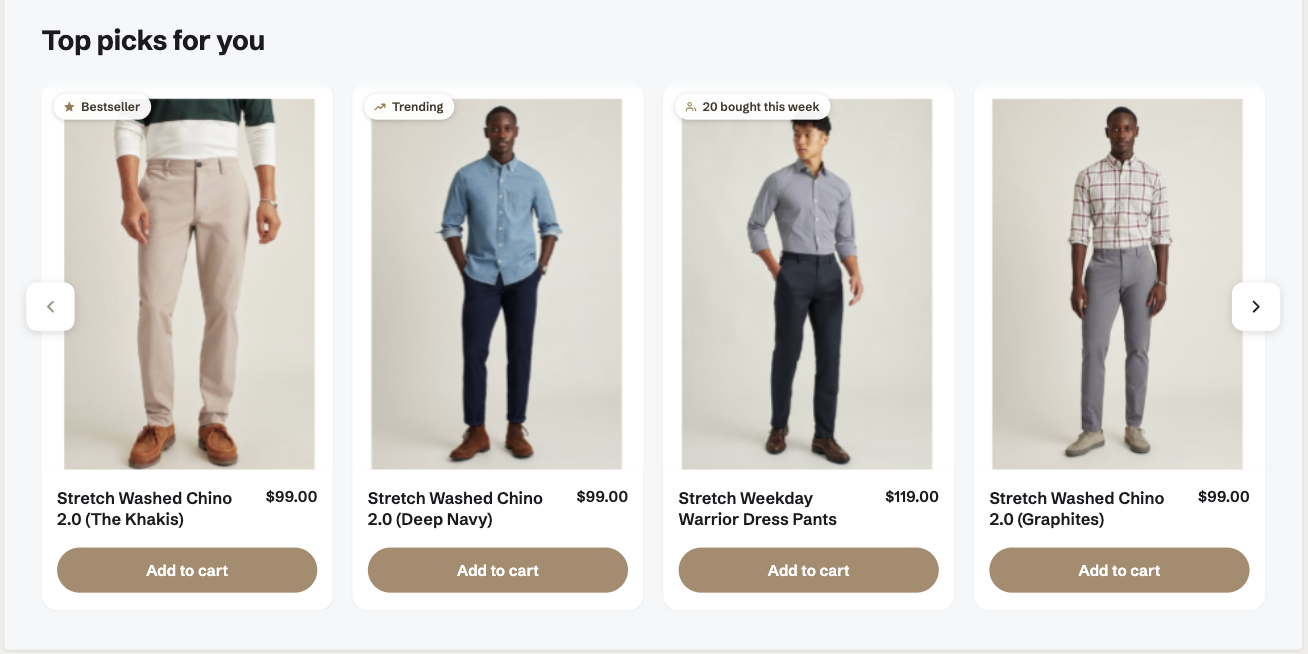
Badges designed to appear in the top-left corner of an item tile in a recommendations pod.
Why it matters:
- Recommendations are most effective when shoppers trust what they see. Badges help build that trust by surfacing familiar, meaningful signals (Bestseller, New, Trending Now) on items they might not have sought out on their own.
- This is particularly valuable in high-traffic carousels, where shoppers are scanning quickly and a well-placed badge can be the difference between a click and a scroll-past.
How badges work
Constructor’s badges algorithm ensures that the most relevant items receive the appropriate badges. The process can be broken down into three main stages: selecting candidates, ranking candidates, and combining badges.
Stage 1: Selecting candidates
First, Constructor identifies items eligible for badges based on specific criteria tailored to each company.
For instance, to qualify for a Bestseller badge, an item must exceed a certain purchase threshold. This threshold is unique to each company and aligns with the company’s KPIs and business strategy.
Here’s an example: A luxury retailer wants to incorporate Bestseller badges on their search and browse pages (categories and collections); however, to avoid too many items qualifying for the badge and potentially cluttering a page, the company sets a high threshold to ensure items maintain an exclusivity when receiving the badge. This means that only items with the highest number of purchases would be identified by Constructor as eligible for the Bestseller badge.
Stage 2: Ranking candidates
Once Constructor identifies eligible items, they are ranked based on several factors, including recent purchase frequency, price, and search result position. This ranking helps determine which items should be prioritized to receive the badge.
Here’s an example: Consider a scenario where two items meet the criteria for a Bestseller badge. If Item A has been purchased 50 times in the past week and appears in the first position on the first search result page, while Item B has been purchased 30 times in the past week and appears on the third page, then Item A would be ranked higher and would likely receive the badge.
Stage 3: Combining badges
In cases where an item qualifies for multiple badges, Constructor applies a priority list to determine which badge should be displayed. This ensures that only the most effective badge is shown to the shopper.
Here’s an example: If an item qualifies for both the Bestseller and Trending Now badges, the algorithm may prioritize the Bestseller badge because it carries more weight in influencing shopper purchase decisions.
Example of badges in action
Let’s look at an example of how Constructor determines the application of a Bestseller badge.
First, Constructor and the example company set a threshold for the number of purchases (or add-to-carts) needed to qualify as a bestseller. In this example, the focus is on the Men’s Shirts category, and the company identifies the threshold based on add-to-carts and purchased items.
Based on this, Constructor identifies five (5) candidates for the Bestseller badge on the first page of results.
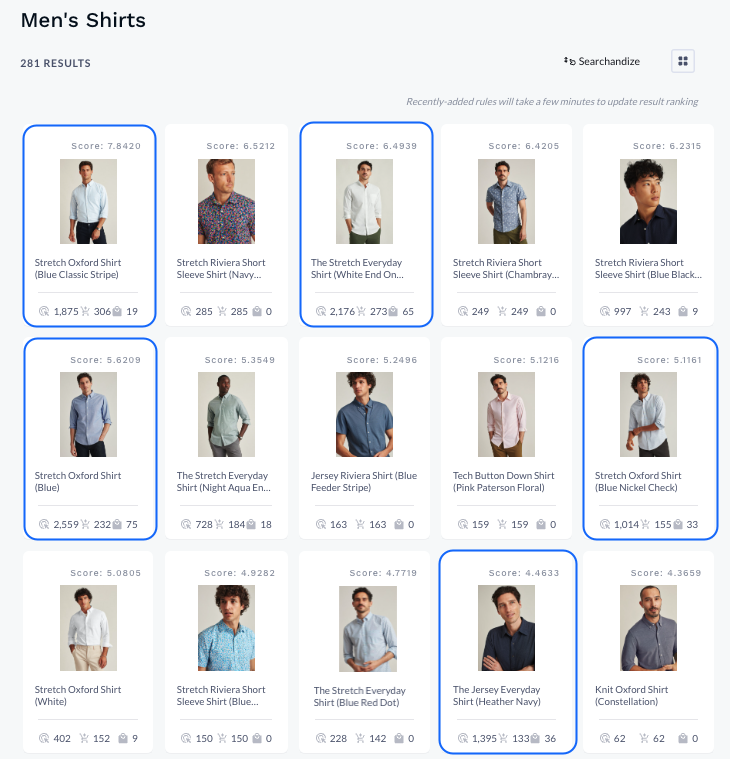
Five candidates identified for the Bestseller badge.
Next, Constructor identifies which candidates ranked highest in results. These items will receive the Bestseller badge.
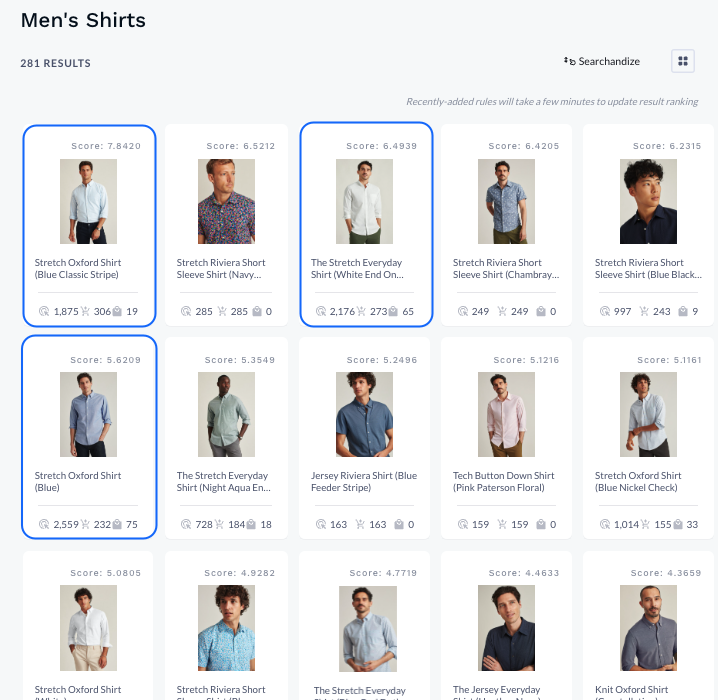
Candidates narrowed to those with the highest ranking.
Now the Bestseller badge will appear for the final candidates on the company’s website. Here is how it might look:
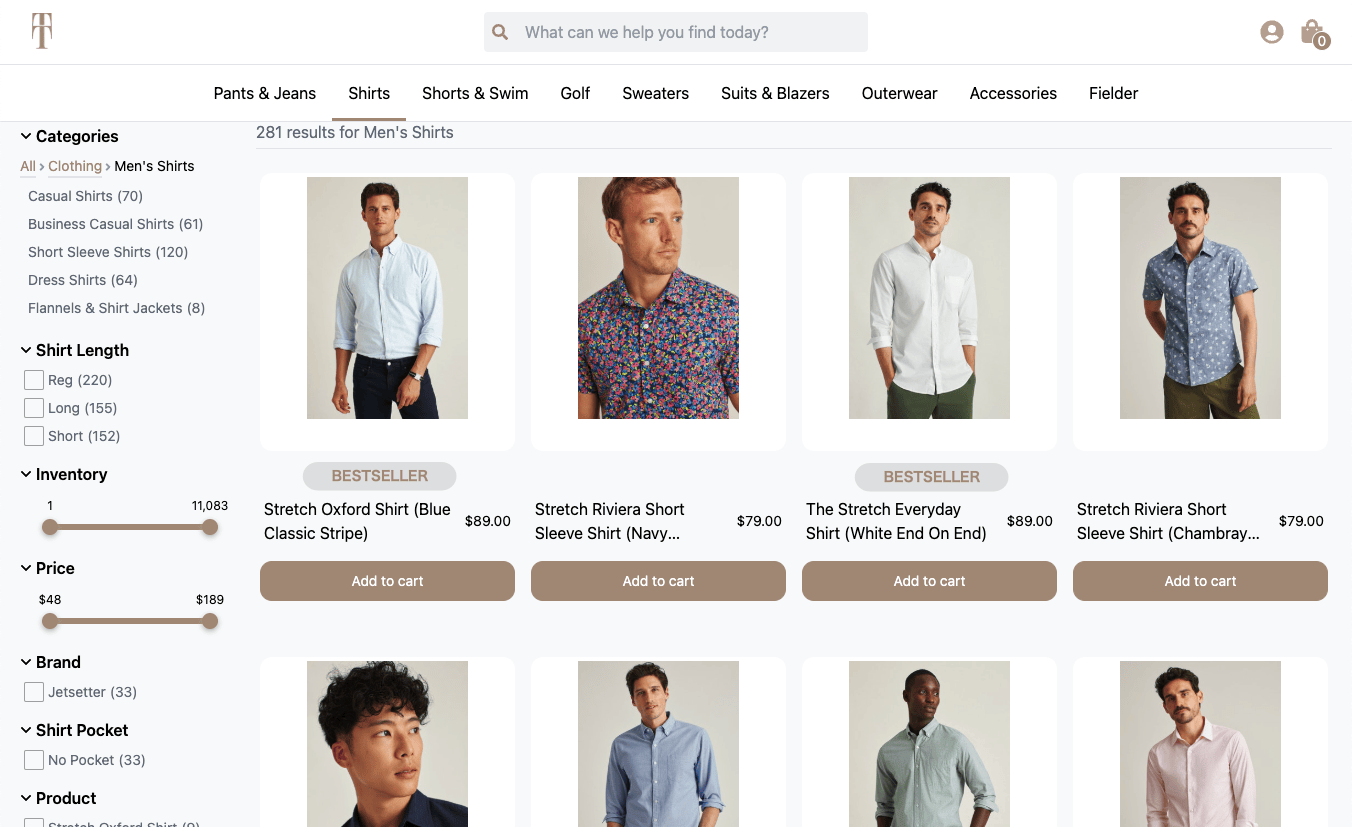
Bestseller badges appear on the tile of top candidate items.
How to get started
Constructor’s standard badges—Bestseller, Trending Now, and New—are available to all companies using Search, Browse, and Recommendations.
Additional badges, such as social proof (e.g., In 17 Carts, 24 Bought Today, etc.) and attribute-based badges (e.g., Eco-Friendly, Premium Materials, etc.) are available for those customers using Attribute Enrichment.
To get started with badges, please reach out to your Customer Success Manager (CSM). The Constructor team will set up your badges pipeline to analyze your data and calculate thresholds for your badges. This can be tested in your testing or development index before being enabled for production.
Learn how to implement badges here.
Updated 4 months ago