---
updatedAt: 2026-09-28T13:22:46.000Z
agentTools:
projectIndex: https://docs.constructor.com/llms.txt
---
# Scayle
The SCAYLE Connector allows you to connect your [SCAYLE](https://www.scayle.com) shop to Constructor. It enables you to quickly synchronize your catalog data with Constructor, including your products, variations, categories, and more.
The connector is built and maintained by SCAYLE and is configured entirely in the SCAYLE Panel, so no code and no middleware are required on your side.
# Why use it?
The SCAYLE Connector accelerates the path to value for joint customers through a ready-made product catalog integration. You configure it once in the SCAYLE Panel - the Constructor API token, one index per shop country and language, and the attribute groups you want to sync - and your catalog arrives in Constructor the way it is modeled in SCAYLE.
* Master key groups become items, variants become variations, and the complete category tree becomes item groups.
* Product changes in SCAYLE reach Constructor within moments, as soon as they are also available through the Storefront API. A recurring full sync keeps every index consistent.
* Constructor IDs are your own reference keys, not SCAYLE-internal IDs. Items carry your master keys and variations carry your variant reference keys, so a search result resolves to a SCAYLE entity through the Storefront API and to the same product in your own systems, without a lookup table.
# Supported versions
SCAYLE and Constructor are both versionless SaaS platforms. The connector is part of the SCAYLE Panel under **Search Integrations** and works with the current Constructor catalog APIs.
### If **Search Integrations** is not visible in your SCAYLE Panel, contact your SCAYLE representative.
# How it works
The connector uses the [SCAYLE Storefront API](https://scayle.dev/api-guides/storefront-api) to fetch the catalog data from your SCAYLE shop. It's also important to note that **the connector is read-only**: it never updates or writes any data back to SCAYLE.
Products in SCAYLE are grouped by **master key**, a reference key you assign to all products of one style. Reference keys are the identifiers you define when you load products into SCAYLE, typically the ones your PIM or ERP already uses. Products that share a master key are siblings, typically the same style in different colors. Each sibling carries its own variants, usually one per size.
Constructor models two levels instead of three, and the connector collapses SCAYLE's three levels into them:
| SCAYLE | Constructor | Rule |
| --------------------------------------- | ----------- | ------------------------------------------------------------------------------------------------------------------------------------------- |
| Master key group (all sibling products) | Item | One master key becomes exactly one item, so shoppers see one search result per style. |
| Variant (of any sibling) | Variation | Every variant of every sibling becomes one variation under that item. Two color siblings with five sizes each yield exactly ten variations. |
| Shop category | Item group | Every category in the shop becomes one item group. Constructor rebuilds the tree from the parent links. |
Each combination of shop, country and language is synchronized into its own Constructor index. Two paths keep an index current:
* A **full catalog sync** rebuilds the complete picture of one index in three confirmed upload steps and prunes records that no longer exist.
* **Live updates** react to individual product events (created, updated, deleted) and patch the affected item and its variations.
Both paths are described in detail under [Synchronization](#synchronization).
# Features
| Capability | Supported |
| ----------------------------------- | ------------------------------------------------------------------------------------------------------ |
| Products, siblings and variants | Yes. One item per master key, one variation per variant. |
| Categories | Yes. Complete category tree as item groups, including parent links, URL path and custom data. |
| Product and variant attributes | Yes. Localized display labels, one metadata field per attribute. |
| Attribute whitelist | Yes. Sync all attribute groups or only selected ones, per shop. |
| Prices | Yes. Per variant, including sale reduction, sale percentage, price before sale and lowest prior price. |
| Availability | Yes. Stock, active flag, sold-out flag and sellable time frame. |
| Images | Yes. All product images with image attributes and custom data. |
| Custom data | Yes. Product, variant and price custom data passed through unchanged. |
| Multi-country and multi-language | Yes. One index per shop country and language. |
| Full catalog sync | Yes. Item groups, items and variations, followed by a prune step. |
| Live updates | Yes. Create, update and delete events per product. |
| Coexistence with other data sources | Yes. Items and variations are merged field by field, so fields written by other sources survive. |
# Installation
The connector is configured per shop in the SCAYLE Panel.
## Collect your Constructor credentials
You need two things from your Constructor account:
* The **API token** used to write to your catalog. The connector uses it for all uploads.
* The **index key** of every index you want to sync to. Index keys start with `key_`. You need one index for every shop country and language combination you plan to enable.
### Caution
Treat the API token as a secret. Enter it only in the SCAYLE Panel, and never share it over chat tools or email.
## Open the provider configuration
Log in to the SCAYLE Panel and select the shop you want to connect. Navigate to `Search Integrations` > `Provider Configuration`, select **Constructor** as the search provider, and enter your Constructor API token.
## Configure countries and indexes
Open the `Country Configuration` tab. It lists every country and language combination of the shop. For each combination you want to serve with Constructor:
1. Enter the index key of the target index in the `Index Key` field.
2. Check `Enabled`. The checkbox becomes available once an index key is entered.
3. Click `Test Connection`. The SCAYLE Panel confirms that Constructor accepts the token for each country index you have configured.
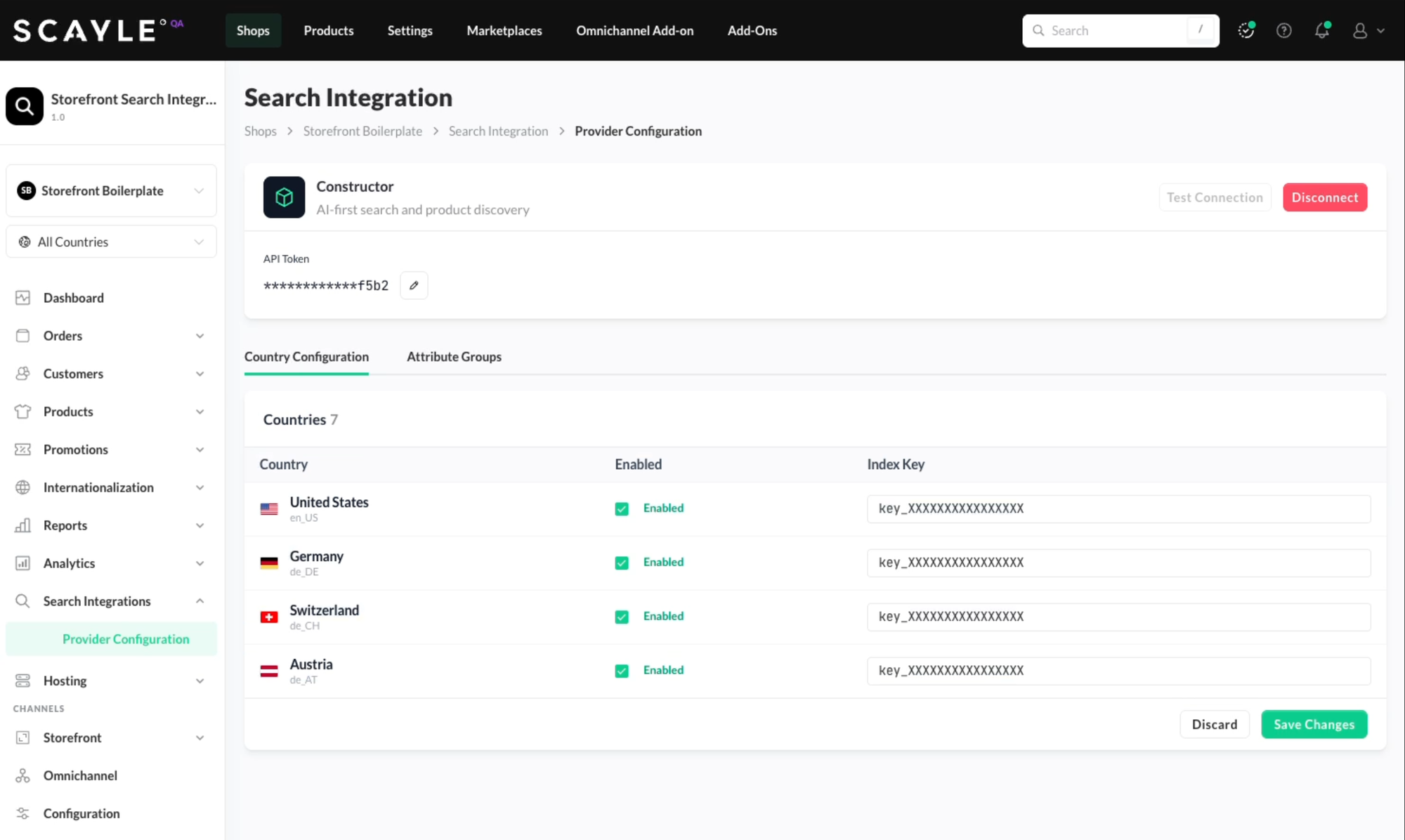
Combinations that stay turned off are not synchronized, and you can enable additional combinations at any time.
### Each enabled combination needs its own Constructor index
Attribute labels arrive in the language of that combination, so a German index contains "Neu" where an English index contains "New." The connector never translates.
## Choose which attribute groups to sync
Open the `Attribute Groups` tab. All default product properties (identifiers, name, prices, stock, images, categories) are always synced. Attribute groups control which additional custom attributes travel alongside them:
* **Sync all attribute groups** sends every attribute group, including groups created later.
* **Sync only selected attribute groups** sends only the groups you add to the list.
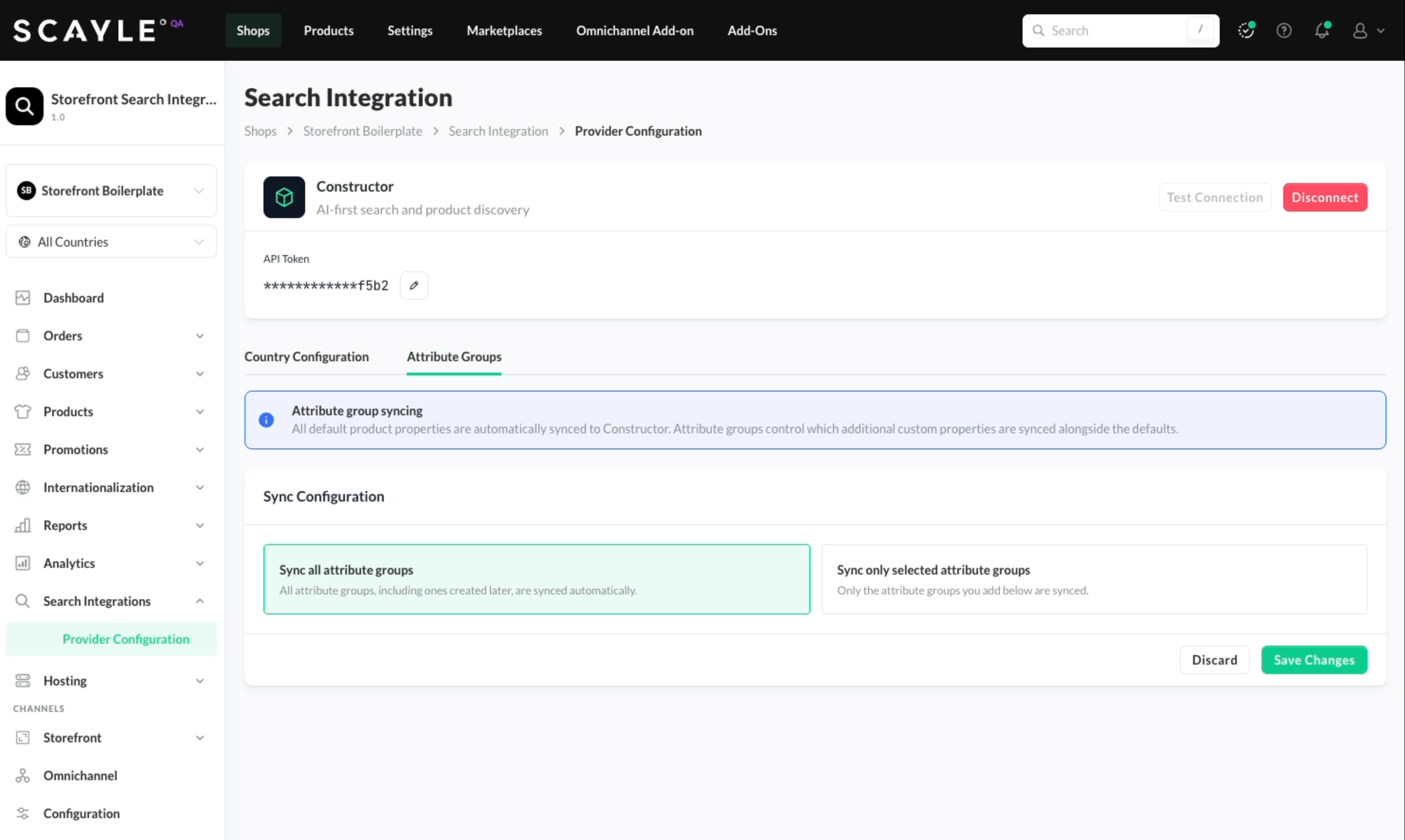
Click `Save Changes`.
## You're all set 🎉
The connector starts synchronizing the enabled indexes. After that, you should start seeing your SCAYLE product data in your Constructor account. Use our visual dashboard to validate your product data within the Constructor platform.
Facets, synonyms, redirects and rankings are configured in Constructor as usual. See [Configured in Constructor](#configured-in-constructor).
# Data mapping
The connector does not invent identifiers, and it does not export SCAYLE's internal numeric IDs as Constructor IDs. Constructor item and variation IDs are the reference keys you define in your product data: the master key and the variant reference key. Because those keys usually mirror your PIM or ERP identifiers, every Constructor record resolves both to a SCAYLE entity and to the same product in your own systems. SCAYLE's internal `productId` and `variantId` travel along as metadata for tracing only.
The examples below use a fictional master key `MW8421` with two color siblings, `MW8421-01` (forest green) and `MW8421-02` (oatmeal), and five sizes each.
## Identifiers
| Reference key | Example | Becomes |
| --------------------- | ------------- | ------------------------------------------------- |
| Master key | `MW8421` | Constructor item `id` |
| Product reference key | `MW8421-01` | Stored on each variation as `productReferenceKey` |
| Variant reference key | `MW8421-01-M` | Constructor variation `id` |
The connector only requires variant reference keys to be unique. Hierarchical naming as in the example is not enforced.
## Categories
SCAYLE shop categories map to Constructor `item groups`. The entire category list is synced, so Constructor can rebuild the full tree.
| Constructor Entity | Constructor Field | SCAYLE Field |
| ------------------ | ----------------- | --------------------------------- |
| `item_groups` | `id` | Category ID |
| `item_groups` | `name` | Category name |
| `item_groups` | `parent_id` | Parent category ID |
| `item_groups` | `data` | Category URL path and custom data |
Products connect to the tree through the `group_ids` of their variations. A SCAYLE product is assigned to category paths, and the connector sends only the deepest category of each path, because Constructor already knows the ancestors from the tree. Filtering on "Clothing" still finds a sweater that is tagged only with "Knitwear."
## Product level
One master key group becomes one `item`. The item is deliberately thin: it exists to give the search result a stable identity, and everything a shopper can search, filter or sort by lives on the variations.
| Constructor Entity | Constructor Field | SCAYLE Field |
| ------------------ | ----------------- | --------------------------------------------------------------------------------- |
| `items` | `id` | Master key (your reference key for the style) |
| `items` | `name` | `name` attribute of the representative product, falling back to its reference key |
| `items` | `data.url` | Storefront API URL of the representative product |
| `items` | `data.image_url` | First image of the representative product |
The representative product is the sibling the SCAYLE Storefront API returns first for the master key. The connector never re-picks it, though Constructor might change it to optimize the shopping experience of your customers.
`data.url` points at the SCAYLE Storefront API, not at a shop page. Anything rendering search results builds the shop product link itself.
## Variant level
Every variant of every sibling becomes one `variation`. Each variation carries the full picture of its variant and of the sibling product it belongs to.
| Constructor Entity | Constructor Field | SCAYLE Field | Notes |
| ------------------ | ---------------------------------------------------------------------------- | ---------------------------------------------- | ---------------------------------------------------------------------------------------------------------------------------------------------------------------------------------------------------------------- |
| `variations` | `id` | Variant reference key | |
| `variations` | `item_id` | Master key | |
| `variations` | `name` | Product name | |
| `variations` | `data.` | Product and variant attributes, flattened | One field per attribute holding the display label, for example `color`, `size`, `gender`. Multi-select attributes become a list of labels. When product and variant define the same attribute, the variant wins. |
| `variations` | `data.attribute_ids` | All attribute value IDs of product and variant | A numeric fingerprint of every attribute value, useful for exact filtering. |
| `variations` | `data.price` | Variant price including tax | Minor units: `8995` is 89.95. Every size carries its own price, and there is no roll-up. |
| `variations` | `data.isOnSale`, `data.saleReduction`, `data.salePercentage` | Applied sale reduction of the variant | `1000` off and `0.1` for a 10% reduction. |
| `variations` | `data.priceBeforeSale`, `data.lowestPriorPrice` | Variant price data | Present when SCAYLE provides them, otherwise `null`. |
| `variations` | `data.stock`, `data.isActive`, `data.isSoldOut` | Variant stock | A variation counts as active when it has stock or is sellable without stock. Product-level flags are not used. |
| `variations` | `data.sellableFrom`, `data.sellableUntil` | Sellable time frame of the product | Epoch seconds. Empty when not set. |
| `variations` | `data.images` | All images of the variation's own product | Full list including image attributes (for example `format: Swatch`) and custom data. An oatmeal variation shows oatmeal photos, not forest green ones. |
| `variations` | `data.group_ids` | Categories of the product | Only the deepest category of each assigned path. |
| `variations` | `data.productId`, `data.productReferenceKey`, `data.variantId`, `data.isNew` | Identifiers and flags | `productId` and `variantId` are SCAYLE-internal numeric IDs, carried as metadata for tracing and sibling-safe deletes. They are never used as Constructor IDs. |
| `variations` | `data.productCustomData`, `data.variantCustomData`, `data.priceCustomData` | SCAYLE custom data | Passed through verbatim. |
## Attribute rules
* **Labels, not codes.** Constructor receives the human-readable label of each attribute value ("Forest Green") in the language of the index. Internal value codes are not indexed as fields.
* **Variant beats product.** Product and variant attributes share one flat namespace. On a name collision, the variant's value is indexed.
* **The whitelist is a gate, not a mapping.** Per shop, the connector sends all attribute groups or only the selected ones, and allowed attributes pass through unchanged.
* **Absence is written down.** Attributes a product does not have, or that the whitelist blocks, are sent as an explicit `null`. This erases any previously indexed value, so stale data cannot linger after a field disappears.
## Example variation
The size M, forest green variation exactly as the connector hands it to Constructor (long lists shortened):
```json
{
"id": "MW8421-01-M",
"item_id": "MW8421",
"name": "Merino Crew Neck Sweater",
"data": {
"color": "Forest Green",
"colorGroup": "Green",
"material": "Merino Wool",
"fit": "Regular",
"neckline": "Crew Neck",
"size": "M",
"gender": "Women",
"careInstructions": ["Hand wash cold", "Dry flat"],
"price": 8995,
"isOnSale": true,
"saleReduction": 1000,
"salePercentage": 0.1,
"stock": 42,
"isActive": true,
"isSoldOut": false,
"sellableFrom": 1785542400,
"group_ids": ["1187", "1204", "1330"],
"images": [
{
"url": "https://cdn.example.com/products/MW8421-01_front.jpg",
"customData": { "alt": "Forest green merino sweater, front view" }
}
],
"attribute_ids": [412, 418, 507, 1021, 1188],
"productId": 20417,
"productReferenceKey": "MW8421-01",
"variantId": 93125,
"priceCustomData": { "priceList": "default" }
}
}
```
`careInstructions` shows how a multi-select attribute is indexed: as a list of labels.
# Synchronization
## Full catalog sync
A full catalog sync runs per index, that is once per enabled shop country and language. It reads all products of the shop in pages, grouped by master key, and uploads three files in order. Each step waits for Constructor to confirm before the next one starts.
1. **Item groups** are replaced wholesale. The connector owns the category tree exclusively.
2. **Items and variations** are merged field by field. Fields the connector owns are updated, and cleared with an explicit `null` where they disappeared. Fields written by other sources are left untouched.
3. **Prune.** The connector hands Constructor the complete list of item and variation IDs it just uploaded, and Constructor deletes everything that is not on that list.
An aborted run never prunes. Products removed from the catalog disappear from search at the latest with the next full sync.
## Live updates
When a product is created, updated or deleted in SCAYLE, the connector re-fetches that product and patches its item and variations in Constructor within moments. Deletes are sibling-safe: only the deleted product's variations are removed, and the item itself is removed only once its last variation is gone.
The full sync is the safetynet for anything the live path could not see.
## Why the sync merges instead of overwriting
The connector may not be the only writer to your Constructor index. Content enrichment, for example curated descriptions, can be added to the same records by other sources. Because items and variations are uploaded as a field-by-field merge, those fields survive every full sync.
Item groups are the exception. They are owned by the connector and replaced completely on each run.
# Configured in Constructor
The connector delivers raw, well-structured data. The following stays in Constructor:
* **Facets.** Which metadata fields appear as filters, and how they behave, is configured in the Constructor dashboard.
* **Searchandising.** Synonyms, redirects, suggested queries and rankings live entirely in Constructor.
* **Content enrichment.** Additional fields come from other sources and are preserved by the merge.
* **Price display.** There is no "from 49.99" roll-up in the feed. Every variation carries its own price, and price displays are computed downstream.
# Good to know
* **Sold-out is indexed, not hidden.** Sold-out products are synced on purpose. `isSoldOut` is an ordinary metadata field, not Constructor's built-in visibility switch, so whether sold-out articles appear in results is a storefront or Constructor configuration decision.
* **Live updates see one sibling at a time.** The live path re-fetches only the changed product, without its siblings. Its variations are patched precisely, but the item's name and image are rewritten to that sibling's values, and they can flip between siblings until the next full sync restores the representative's values.
* **Every variation repeats its product's images.** All sizes of a color carry the identical image list. This is harmless for search, but it makes variation records heavier than the source data.
* **A product created mid-sync can briefly vanish.** If a product appears while a full sync is running, the prune step may remove it because it was not part of that run's snapshot. Its next update event, or the next full sync, brings it back.
# Support
* Questions about the connector configuration in the SCAYLE Panel: contact SCAYLE support through your usual channel.
* Questions about your Constructor account, indexes, facets or searchandising: contact your Customer Success Manager.